
The introduction of translucency effects in MacOS Yosemite back in 2014 was a step backwards in usability and power efficiency as I discussed here. Translucency effects were computationally intensive to render and on older systems, can result in high GPU utilisation and frame drops during normal everyday activities like scrolling or browsing the web.
Fast forward to 2022 and the Mac hardware landscape has changed dramatically. We now have Apple Silicon SoCs that can achieve levels of performance only seen in high end systems with discrete GPUs, but with power consumption orders of magnitude lower. M1/M2 Macs can sustain high frame rates of >60fps in the MacOS UI despite translucency effects smattered all over the interface, and the sheer power efficiency of Apple Silicon should make these effects essentially free from a power consumption perspective. Right?
I decided to take a look at the impact of translucency effects on power consumption of various functional units of the M1 Max SoC including CPU, GPU and DRAM controller. To do this, I used the powermetrics utility (Terminal, sudo powermetrics), which helpfully lists clock speed of the CPU/GPU clusters and power consumption at regular intervals. asitop was used to estimate memory bandwidth. All non-essential background apps were quit and the system was monitored to ensure things like Spotlight indexing were not running during the test.
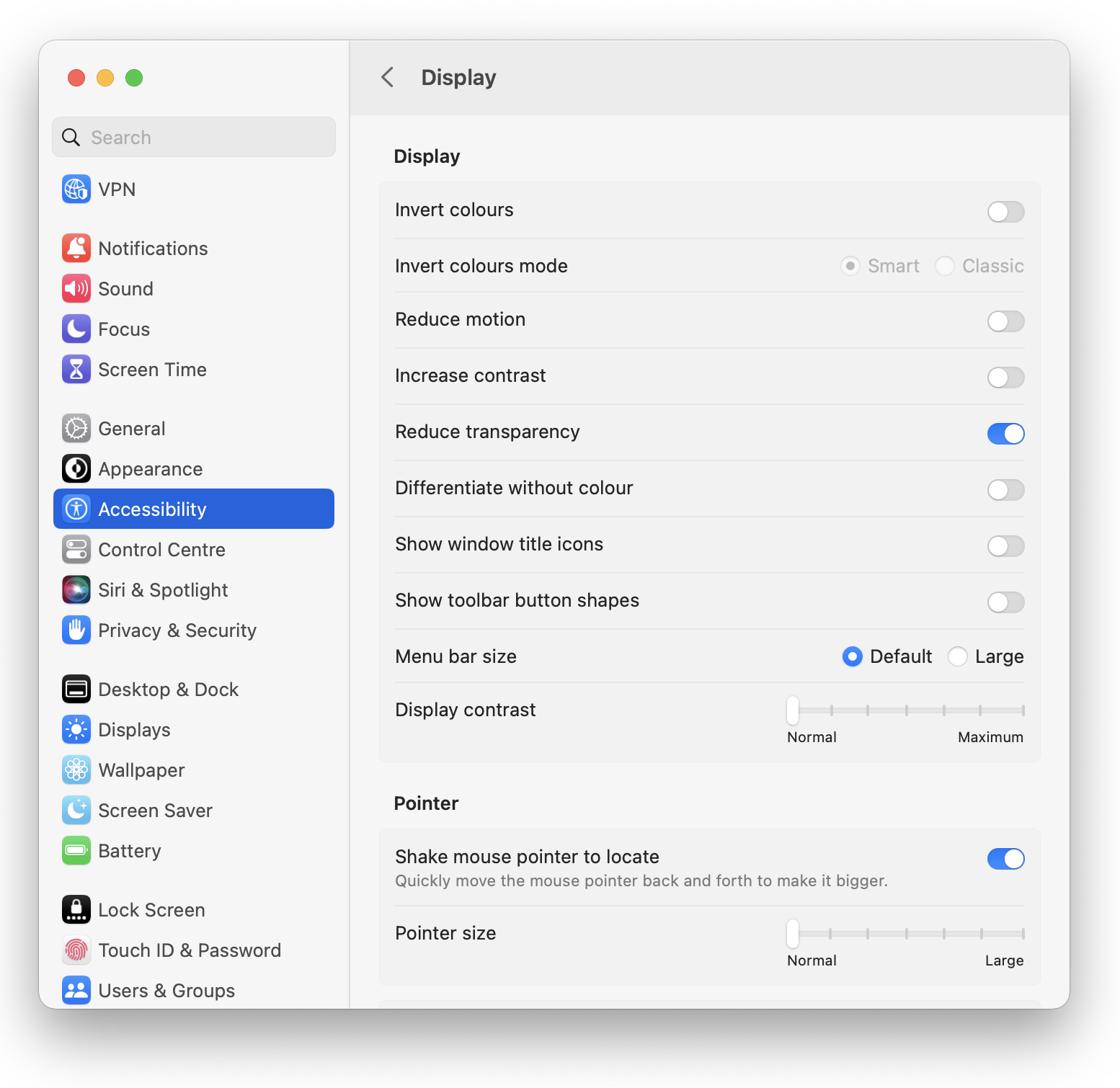
Translucency effects were toggled in System Preferences (or “System Settings” under MacOS Ventura) > Accessibility > Reduce Transparency.
System tested: MacBook Pro 14, M1 Max 10/32, 64GB RAM

Based on preliminary testing, I found that the biggest performance/power impact of translucency effects in MacOS occur when a translucent window UI is placed over a video. In this scenario, I left a video playing in IINA (a great media player for MacOS by the way) and placed the sidebar of a Finder window over it.
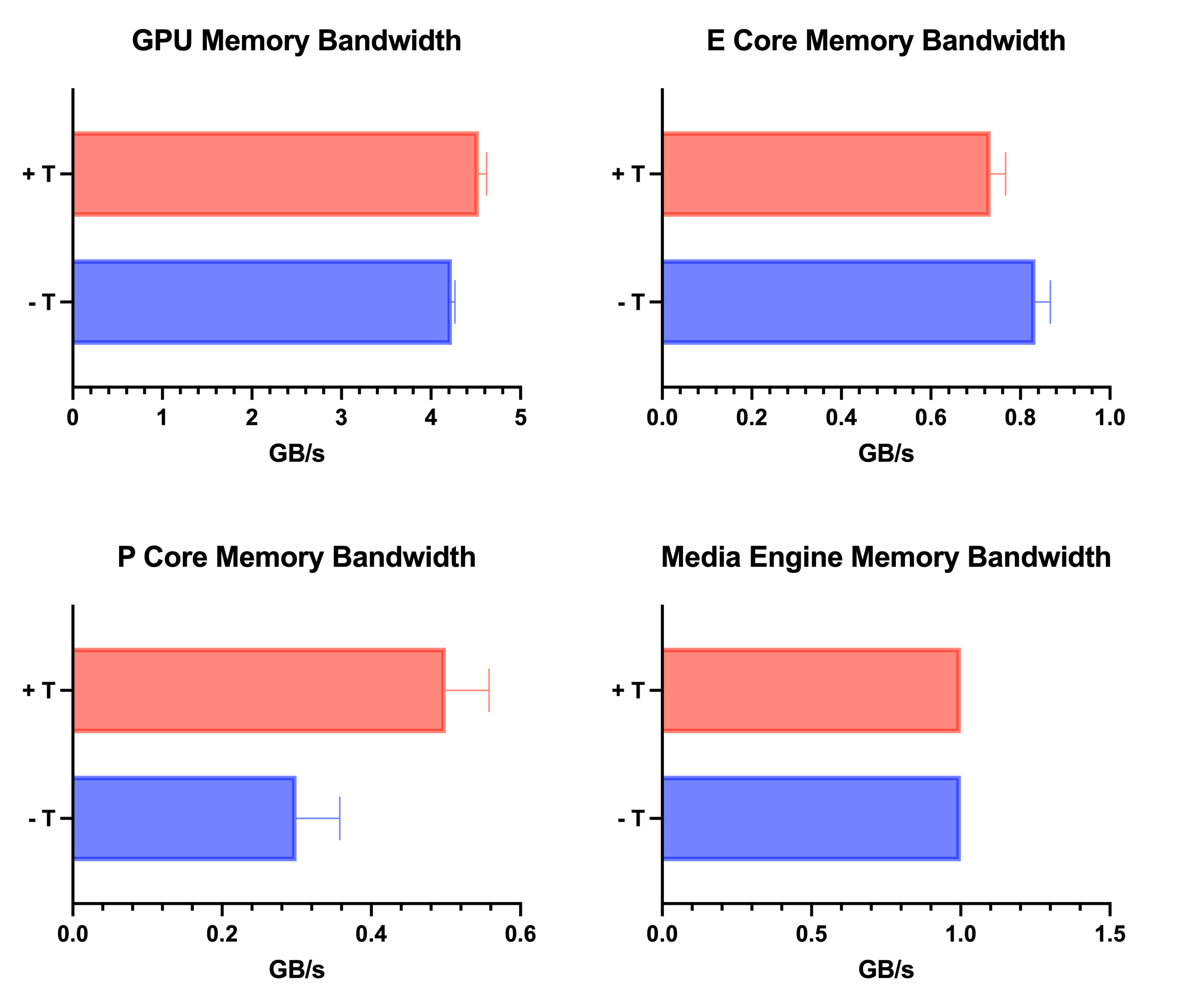
First, let’s start with memory bandwidth. We would expect that translucency effects will increase demands on DRAM due to the additional rendering of window UI, and for GPU and P Cores this is exactly what we see. Interestingly, E Core memory bandwidth decreased slightly which was unexpected, and the Media Engine was unaffected by translucency effects. Although there were differences in memory bandwidth requirements between translucency on or off, the numbers here are quite small considering that the M1 Max DRAM is capable of just over 400GB/s. To be honest, I wouldn’t expect these results to make any meaningful difference in performance of everyday workloads.
I suspect that after usability concerns, power consumption would be a big reason to turn translucency off in MacOS. For example, in light everyday workloads, ensuring that the SoC is able to stay in idle/power gated states by reducing CPU utilisation of background tasks etc can make the difference between 5 or 9 hours of battery life. So what impact does translucency have on power consumption of Apple Silicon?
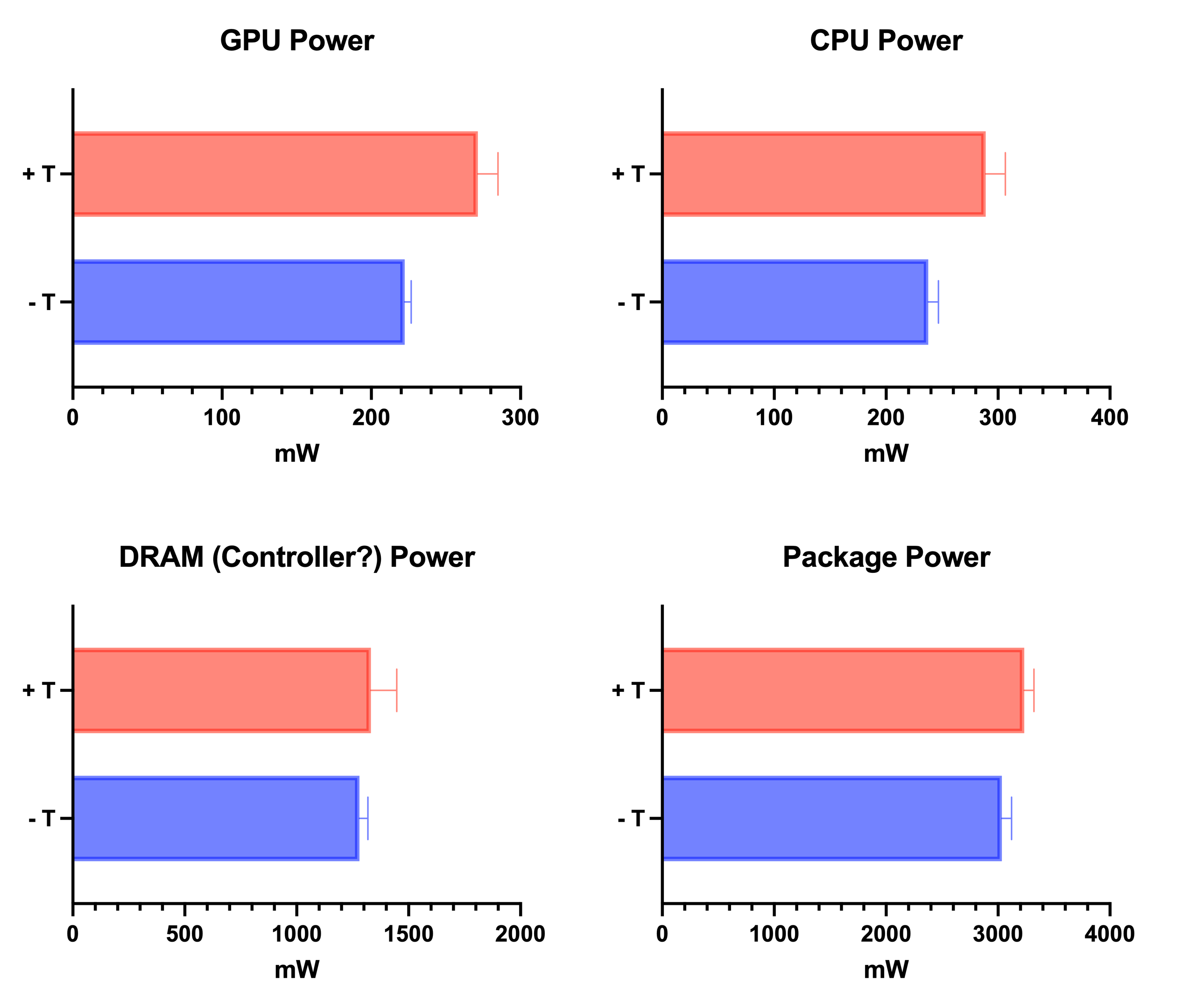
With translucency turned on, the power consumption of all the functional units I could see on powermetrics was higher, especially the CPU and GPU which consumed around 50mW more compared to translucency turned off. DRAM power increased slightly, although the difference was masked by variation in the readings. The impact of translucency on CPU, GPU and DRAM (as well as other blocks of the SoC which I was unable to measure) resulted in a ~200mW increase in total package power. A 200mW increase in power consumption equates to around 20 minutes less battery life on a 14 inch MacBook Pro.
So, should you turn off translucency in MacOS?
The answer depends on your personal preference (subjective) and the impacts on system performance (a little more objective). Prior to the Apple Silicon transition, I opted to reduce transparency effects on my Intel Macs and would have recommended others to do the same based on the impacts on system performance and power consumption alone. However, those on Apple Silicon need not worry so much about the performance/power consumption impacts of translucency effects (unless squeezing every last minute of battery life is the top priority).
 ATR93
ATR93 
Excellent article. Detailed benchmarks like this are hard to come by. 🤘
Thanks, David!
Very interesting and reminds me of the concerns when Windows Vista was released with its visual effects on power consumption and GPU resources. In many ways I don’t even like the translucent behavior at times. Its more attractive then a actual visual aide. I have experimented with Reduced Transparency on and off. I do think I prefer it off not so much to save energy but more for visual clarity.