
With every release of Mac OS comes a host of bugs and issues for users. A particularly annoying one in Mac OS High Sierra (10.13) involves the dGPU underperforming in graphically intensive applications after the system has been asleep for a few hours.
Users typically report a massive drop in FPS in games and performance drops in applications which require dGPU. I’ve linked some of the reports of this issue below. As far as I’m aware, Apple have not acknowledged the issue despite it being a problem since the GM release of 10.13 High Sierra. The 10.13.2 beta does not solve this issue.
https://forums.macrumors.com/threads/2017-mbp-15-radeon-gpu-does-not-work-after-resume-from-long-sleep.2076334/
https://discussions.apple.com/thread/8122451?start=0&tstart=0
https://forums.macrumors.com/threads/high-sierra-and-games.2076031/
https://us.battle.net/forums/en/d3/topic/20759376280
The Problem
If the user tries to play a graphically demanding game on a 2016/2017 MacBook Pro with either Radeon 450/455/460/550/560 dGPU after the system has been in sleep mode, they will typically see a ~50% reduction in FPS. Rebooting the system temporarily resolves the issue, but the problem reappears after the device has been in sleep for a few hours.
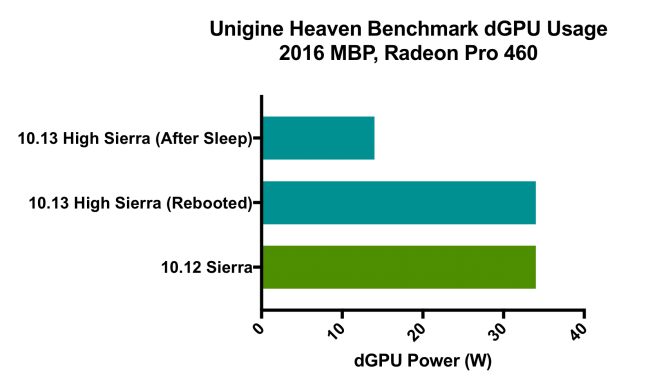
In normal operation, running Unigene Heaven benchmark activates the dGPU and results in high utilisation causing a power draw of ~32W, which is expected and similar to utilisation in macOS Sierra (10.12).
After resuming from system sleep, running Unigene Heaven again activates the dGPU, but the frame rate has dropped by ~50% and the power draw of the dGPU is now ~14W.
Restarting the system will fix the issue until the system sleeps again.
I’m able to reproduce this problem in all games that use the dGPU on my system, including Alien Isolation, Cities Skylines, Borderlands 2, Hitman Absolution, Dying Light, Team Fortress 2 among others.
Quick Fix
A temporary workaround to this issue is not allowing the system to sleep. Using a utility like NoSleep prevents your MacBook from sleeping when the lid is closed. Obviously this comes with a power consumption penalty when the system is idle or being transported, but depending on your routine it may work for you and easier than rebooting the system multiple times a day.
 ATR93
ATR93 
Do you know if someone has reported it here: https://bugreport.apple.com
?
I just heard it is still reproducible even in the recently released 10.13.3 beta 1. Not so good news.
I can say that I haven’t yet been able to reproduce it in 10.13.2 on the MacBook Pro (Late 2013) I have, but this computer has an Nvidia GPU (if that matters). But I think I did bump into the issue one time while on 10.13.1. So maybe the issue only happens with AMD GPUs now? Bad enough of course, since that’s what Apple’s current laptops are using.