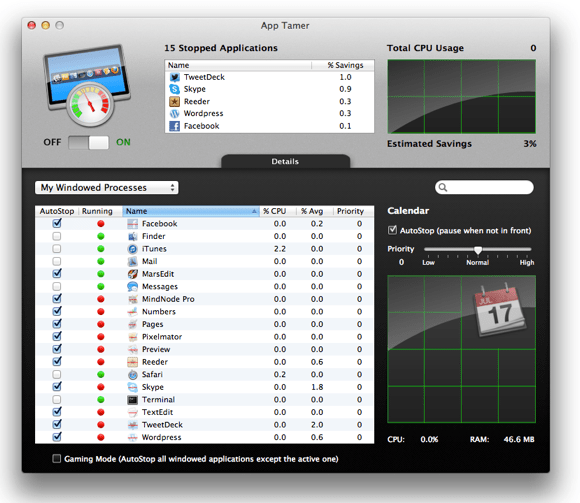
Most Applications for OSX behave politely in the background, sitting idle and consuming very little CPU time. There is the exception however which continue to use CPU even while in the background and seemingly doing nothing. Not only are these applications reducing performance of foreground tasks, but the additional workload also reduces battery life and increases heat.

Control rampant background apps with App Tamer
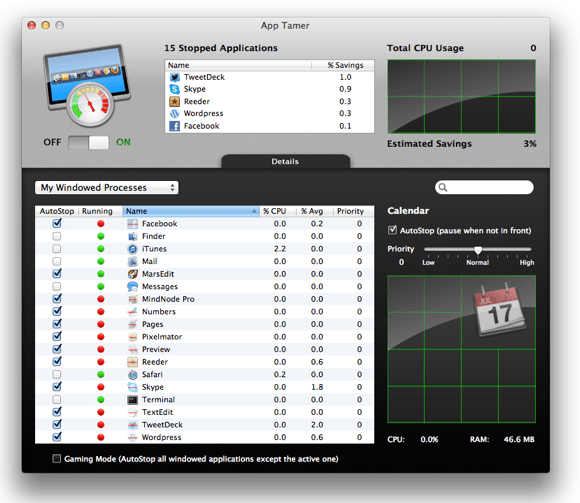
The purpose of App Tamer is quite simple, “pause” selected background apps to prevent them from using CPU, then instantaneously resume them when you need them. My workload involves having almost all of my frequently used applications open at once, and switching between them as I work. Of course, you probably won’t want to do this on a Windows computer, but the “Mission Control” feature in Mountain Lion makes it feasible work like this (8GB of RAM and an SSD probably help as well).
The problem is that normally, I only use 1 or 2 apps at a time, and those in the background are constantly using CPU. Idling on the desktop, CPU usage with all apps open is ~15% (with Skype contributing to ~7%). Idle CPU usage should ideally be closer to 5%.
Spinning Beach Ball
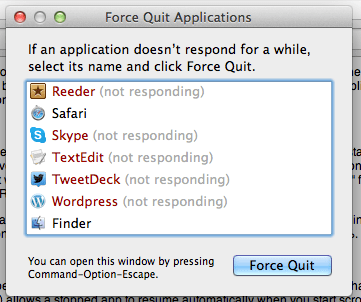
Apps which have been stopped by App Tamer will appear as “Not Responding” by the OS, and unless you switched to that particular app, it would be completely unusable. A recent update (1.3.2) allows a stopped app to resume automatically when you start scrolling, useful if you’re working on two windows side by side.
A Few Tests
Battery Life, With and Without App Tamer

Idle battery life shows a huge difference, with the CPU able to spend more time in C4 sleep state. This test was done on a Core 2 Duo MBP, newer Sandy Bridge/Ivy Bridge MBPs may see an even larger difference due to lower idle power consumption.
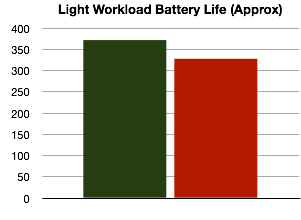
Light workload includes web browsing, watching a few videos etc. Still a reasonable difference in battery life.

The heavy workload involves scanning a PDF using OCRKit, a task which stresses the CPU, Memory and read/writes to the SSD. Graphics is mostly idle in this test. Very little difference due to maxed out CPU, although with lower background CPU usage, the task may have fished quicker.
Idle CPU Temperatures (Room Temperature 26 degrees C)
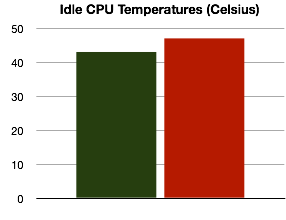
Notebook left to idle for 15 minutes at room temperature. Fan = 2000RPM.
What to Stop
Generally, you would want to stop only windowed applications that you’ve installed, and leave background/system processes alone. Apps for media playbacks such as iTunes, QuickTime, Movist etc shouldn’t be autostopped (doing so would stop playback when the application is in background).
Safari is a good one to autostop for example, leaving a Facebook tab open while in the background causes the browser to use ~7% CPU. App Tamer is smart enough to let downloads finish before stopping Safari.
Evernote can be autostopped, though if you use services which integrate with Evernote (such as clippers etc), these would “freeze” while they wait for Evernote to respond. This is also the reason why the Finder shouldn’t be autostopped.
Twitter and Tweetdeck can be autostopped safely, though obviously you lose the ability to update tweets/mentions etc in the background. However, App Tamer can “wake” stopped background apps at specified intervals to allow them to update/free memory etc.
Skype is an interesting one. While it isn’t an app I’d recommend autostopping, idle CPU usage is so ridiculously high that I find it beneficial to autostop it, saving ~7% CPU in the process. Although receiving calls becomes impossible.
Photoshop (and to less extent, Pixelmator) also have unusually high idle CPU usage. These applications are perfect for autostopping.
Fluid App
Fluid is a OSX app which allows you to create “applications” from websites. These applications are separate from Safari, allowing more granular over autostop. As of 1.3.2, support for Fluid is quite patchy but an update to fix this is on the way.
Pricing
At ~£13.14 GBP (inc VAT), App Tamer is reasonably priced for what it does. Of course, if your workflow doesn’t involve many applications open in the background, then App Tamer would make very little difference. However, I would assume most users would benefit from App Tamer, even if you don’t have a plethora of apps open. Simply having Photoshop running in the background utilises 5% CPU, and quitting/restarting the app would be slow (and probably use more power anyway), and this is where App Tamer really makes a difference. It stops apps in the background, but keeps the process open, so that the moment you need to use the app, its ready.
Find App Tamer here!
 ATR93
ATR93 